
Choose AI processing, privacy, and costs
5 minUnderstand where a request is processed, what optional cloud access means, and how to make an informed choice before sending personal context.
Watch the steps
Connecting playback controls…
Read the on-screen captions
- Artwork Backend selects the image-processing route.
- Image Playground is separate from OpenAI BYOK.
- Review Memory Context and Tool Confirmations.
- Check Private Cloud status. Device support varies.
Step by step
Start with the on-device option
MyPraise App uses Apple’s Foundation Models for supported on-device text tasks. The model processes that request on your device, without an OpenAI API key or an OpenAI per-request charge. Other app services and optional tools have their own data flows; this is not a claim that the entire app is always offline.
Understand Apple Private Cloud
Apple Private Cloud Compute is a distinct Apple route for supported text requests. In this preview it requires iOS 27, a compatible build and device, and current service availability. It does not require Believer or a BYOK key. Apple applies usage limits. In Profile → Settings, scroll to Apple Private Cloud. Review Status, Use Private Cloud by default, and Prefer Private Cloud for harder questions; unavailable or exhausted Apple cloud can fall back to an available on-device model.
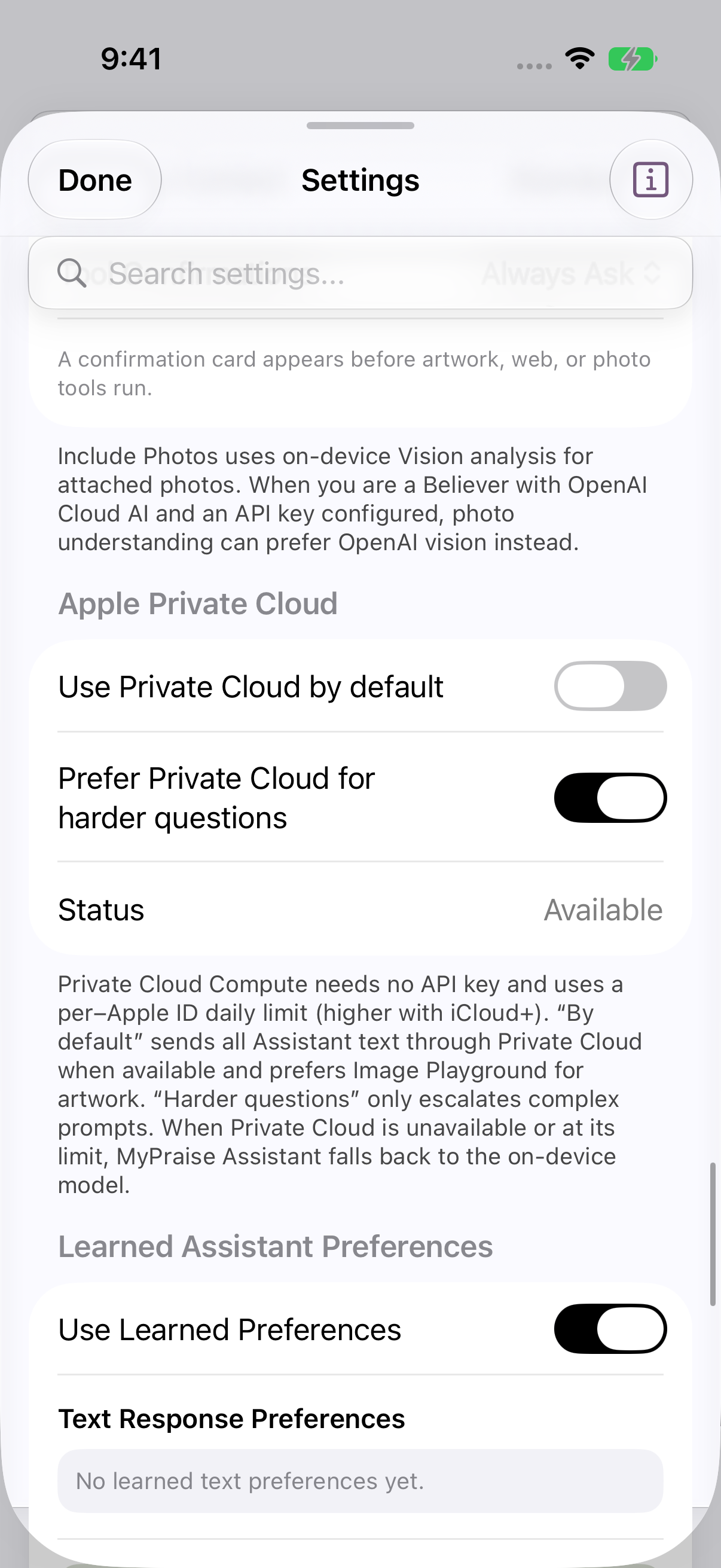
Apple Private Cloud settings and Available status in the isolated simulator; hardware behavior unverified. earlier 1.1.0 recording. Separate Image Playground from BYOK
Image Playground is Apple’s image experience. Apple styles and external ChatGPT styles are different choices; do not assume every Image Playground request stays on-device. Selecting ChatGPT follows Apple’s external-provider flow and is separate from the OpenAI API key used by MyPraise App BYOK.
Understand optional paid BYOK
BYOK means Bring Your Own Key. Believer unlocks optional OpenAI tools; Cloud AI Features and a configured OpenAI API key are also required. Live web research, cloud vision, and OpenAI artwork can send requests and needed context to OpenAI. Your MyPraise App subscription does not pay those API charges, and ChatGPT subscription billing is separate from API billing.
Review privacy before sending
In Cloud AI (BYOK), inspect the available privacy controls before selecting a tool. Private memory context is not sent to optional non-local Assistant requests in this release. Photos or text you explicitly provide to a cloud tool have their own data flow; review its confirmation. The BYOK key stays in this device’s Keychain, not iCloud settings.
Use costs and limits to choose deliberately
Available Apple processing can avoid OpenAI usage charges for those requests. BYOK lets you choose optional cloud capabilities, but can cost more depending on model, context size, tools, images, and retries. Review actual provider usage and billing; an in-app request count is not a complete bill or spending cap. Start with the simplest route that meets your needs.
Check the result and the current terms
OpenAI says API data is not used for training by default, unless you opt in; retention and storage depend on endpoint, features, and account controls. Apple describes PCC protections separately. These policies do not make AI infallible. Check facts, Scripture, and the memories used, and consult the provider documentation listed below for current requirements and terms.
Keep exploring
If something looks different
Checked against MyPraise App 1.1.0 · 2026-09-21
Before you begin
- For MyPraise App 1.1.0. Apple has approved this version; availability depends on the owner’s manual App Store release.
- Earlier MyPraise App 1.1.0 (34) recording. These instructions describe the preview build, not App Store release 1.0.3.
- The clip demonstrates available Apple settings. BYOK setup controls are described from this build’s implementation but were not accessible at the sample account’s tier; no key was entered or paid request made. Hardware-dependent processing remains unverified.
- Video and screenshots retain their original capture dates and build provenance; most existing walkthroughs were recorded with 1.1.0 (34). They are not new build 53 recordings.
- Processing-route descriptions are settings guidance, not a successful cloud execution demonstration. This release excludes later Brave and Private Cloud routing developments.
The screen looks different.
Guide screens may come from different versions of MyPraise App. Always download the latest MyPraise App from the App Store.
If a control is still missing, open Settings → Support for help.
Are all my memories uploaded or used to train the Assistant?
Memory retrieval supplies selected context to a request; it is not model training. On-device processing and cloud requests differ. Cloud tools can transmit relevant excerpts or selected media when enabled and approved, and optional research indexing can create provider-side stored resources. Do not describe all AI use as device-only.
Does Anonymous Cloud Mode make me anonymous to the provider?
No. It reduces specified profile/location content in MyPraise App’s request preparation. The provider still receives a request through your account, and sensitive details may remain in text or images you choose to send. Review content yourself.
Is Apple Private Cloud unlimited or guaranteed free forever?
No. It needs no MyPraise App BYOK key, but Apple controls availability, quotas, and future access terms. This guide does not promise unlimited service or permanent pricing.
How much will I save?
There is no guaranteed saving. Apple processing can avoid API charges for supported requests. Compare your actual MyPraise App plan and provider usage with your alternatives; this guide makes no numerical savings claim.
Where can I verify provider information?
Apple requirements: https://support.apple.com/en-us/121115 · Apple Image Playground: https://support.apple.com/en-ae/guide/iphone/iph0063238b5/27/ios/27 · OpenAI API data controls: https://developers.openai.com/api/docs/guides/your-data · Separate billing: https://help.openai.com/en/articles/9039756 · Usage review: https://help.openai.com/en/articles/10478918