
Choose featured and favorite photos
3 minDistinguish a favorite photo, the main memory photo and the photos included in a card.
Watch the steps
Connecting playback controls…
Read the on-screen captions
- Choose Share as a card
- Heart: favorite a photo
- Star: choose the main photo
- Tap a tile to change this card’s photos
- Review the selected photos before sharing
Step by step
Open the card preview
Open the memory’s share controls and choose Share as a card. Find Featured photos.
Mark a favorite
Tap the heart on a photo to favorite it. In the example Sarah has the filled heart.
Choose the main photo
Tap the star on the photo you want as the hero and Home thumbnail. The example chooses Ike. The main-photo and favorite choices were verified after relaunch.
Choose this card’s photos
Tap a photo tile to include or exclude it from the current card, then review the preview. This selection is for the card composition; it is separate from the saved favorite and main-photo choices.
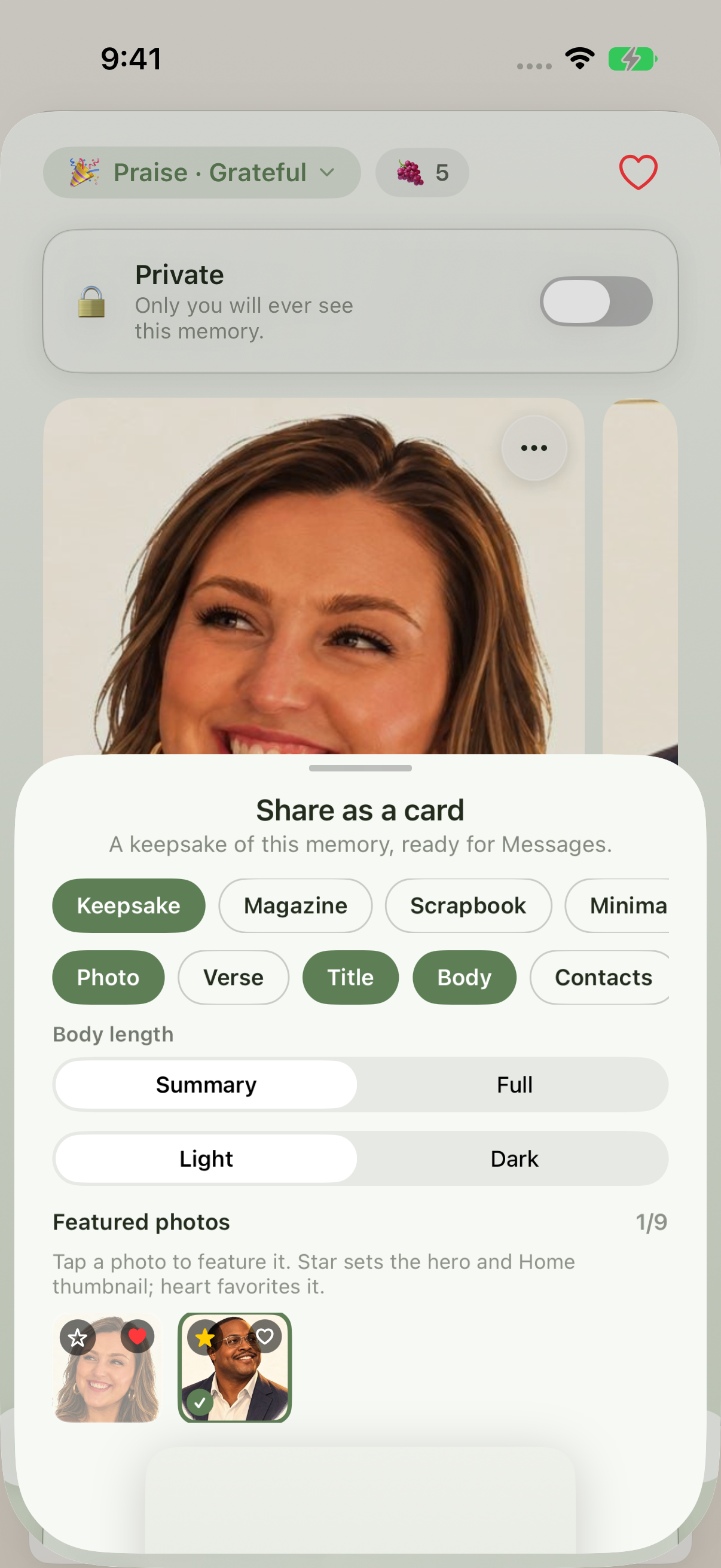
Heart means favorite; star means main photo; the checkmark selects the photo for this card.
Keep exploring
If something looks different
Checked against MyPraise App 1.1.0 · 2026-09-20
Before you begin
- For MyPraise App 1.1.0. Apple has approved this version; availability depends on the owner’s manual App Store release.
- Earlier MyPraise App 1.1.0 (34) recording. Screens may differ from the released app.
- Open a memory with at least two loaded photos. The example has Sarah and Ike portraits. No message is sent in this walkthrough.
- Video and screenshots retain their original capture dates and build provenance; most existing walkthroughs were recorded with 1.1.0 (34). They are not new build 53 recordings.
The screen looks different.
Guide screens may come from different versions of MyPraise App. Always download the latest MyPraise App from the App Store.
If a control is still missing, open Settings → Support for help.
Why did the card selection change when I reopened it?
Card photo selections belong to the current composition. Favorite and main-photo choices are separate saved settings. Check the card preview each time before sharing.